M&A Teaser Examples: Business Sale Teaser Document Template, What to Reveal and What to Hide
M&A teaser examples share one shape: a one- or two-page blind profile that names the trade, region, size band and deal type, and holds back the company name, city and exact figures until a buyer signs an NDA.
Key takeaways
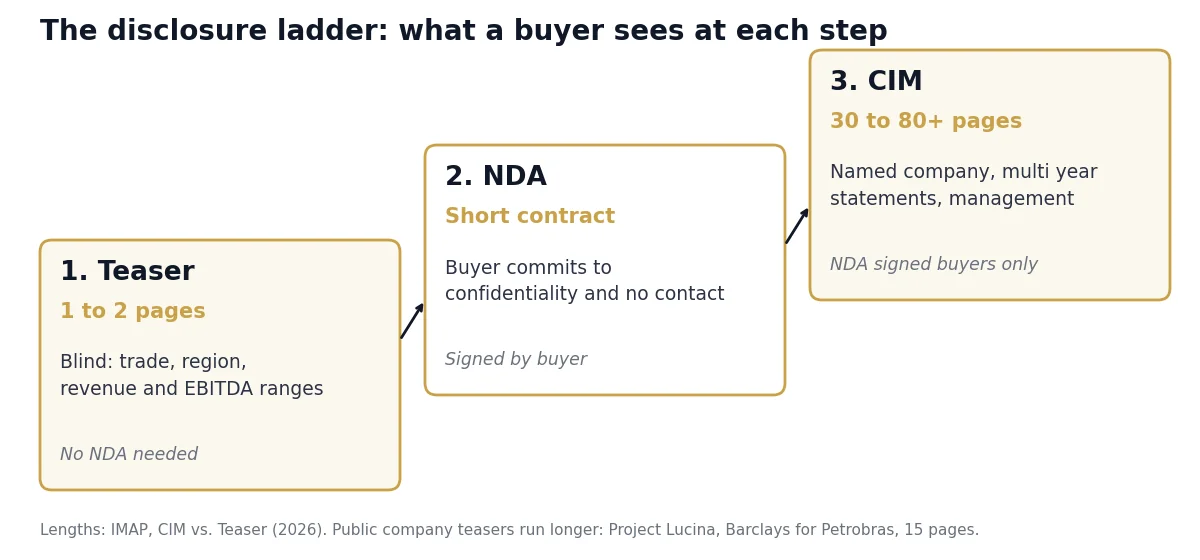
- A teaser is “typically one to two pages in length” and goes out before any NDA; the CIM runs 30 to 80+ pages and goes only to NDA-signed buyers (IMAP, 2026).
- Corporate Finance Institute gives both “one- or two-page” and “two or three pages” on the same page (CFI, October 29, 2019): aim for one page, stop at two.
- Barclays’ published Project Lucina teaser for Petrobras ran 15 pages, 5 of them disclaimers, and named the seller because the sale was announced on October 4, 2021 (Petrobras).
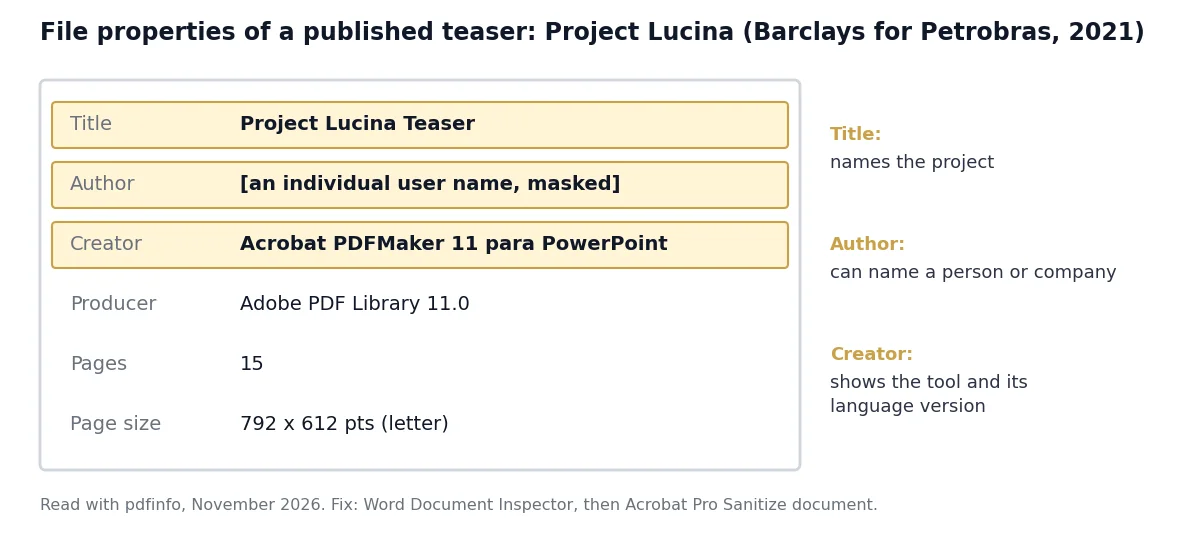
- The Lucina PDF still shows an individual’s user name in its Author field: file properties survive export unless you remove them.
- Acrobat Pro’s Sanitize document removes “metadata, comments, hidden layers” from a PDF (Adobe, updated October 22, 2026).

What is an M&A teaser, and how does it differ from the NDA and the CIM?
An M&A teaser is the first document a buyer sees in a sell-side process: a one- or two-page anonymous summary sent without an NDA, which IMAP calls a “blind profile”. Buyers who want more sign the NDA, covered in our guide to NDAs in a business sale, then receive the named confidential information memorandum.
| Document | When it goes out | Length | Names the company? | Financial detail | Source |
|---|---|---|---|---|---|
| Teaser (blind profile) | First contact, before any NDA | 1 to 2 pages | No, for a private company | Revenue and EBITDA ranges, growth | IMAP, 2026 |
| NDA | When a buyer asks for more | Short contract | Yes, inside the agreement | None | CT NDA guide |
| CIM | After the NDA is signed | 30 to 80+ pages | Yes | Multi-year statements, customers by type, management | IMAP, 2026 |
| Public-company teaser | After a public announcement | 15 pages (Project Lucina) | Yes | Asset statistics, eligibility, disclaimers | Barclays, October 2021 |
M&A teaser example 1: a blind teaser for a $2.5M to $3.5M EBITDA company
This sample is the teaser the owner of a founder-led commercial HVAC company with $2.5M to $3.5M of adjusted EBITDA would send to private equity and strategic buyers. It is illustrative: the company and every figure are invented. It is the finished version of the line-by-line rewrite in the mosaic test table below.
Illustrative sample teaser A · invented company, invented figures
Project Meridian: Commercial HVAC Service Platform, Southeast U.S.
The business. Founder-led commercial HVAC service, repair and replacement contractor serving healthcare, education and light-industrial facilities from multiple branches across a multi-state Southeast footprint. 50 to 75 employees.
Investment highlights.
- 55% of revenue under multi-year maintenance contracts.
- 12% revenue CAGR over the trailing 3 years, driven by new contract customers.
- Top 10 customers are 35% of revenue; healthcare and education lead.
- CFO and operations lead each in seat 8+ years, so the founder can step back.
- Room for add-on acquisitions in adjacent Southeast metros.
| Financial snapshot (TTM, adjusted) | Range |
|---|---|
| Revenue | $15M to $20M |
| Adjusted EBITDA | $2.5M to $3.5M |
| Gross margin | 30% to 35% |
| Recurring contract revenue | 55% of total |
Transaction. 100% sale of equity, all-cash structure preferred, limited rollover available. NDA on request; the CIM goes to signed parties within 48 hours.
Contact. Advisor name, firm and direct line only, never the owner. For information only; not an offer to sell.
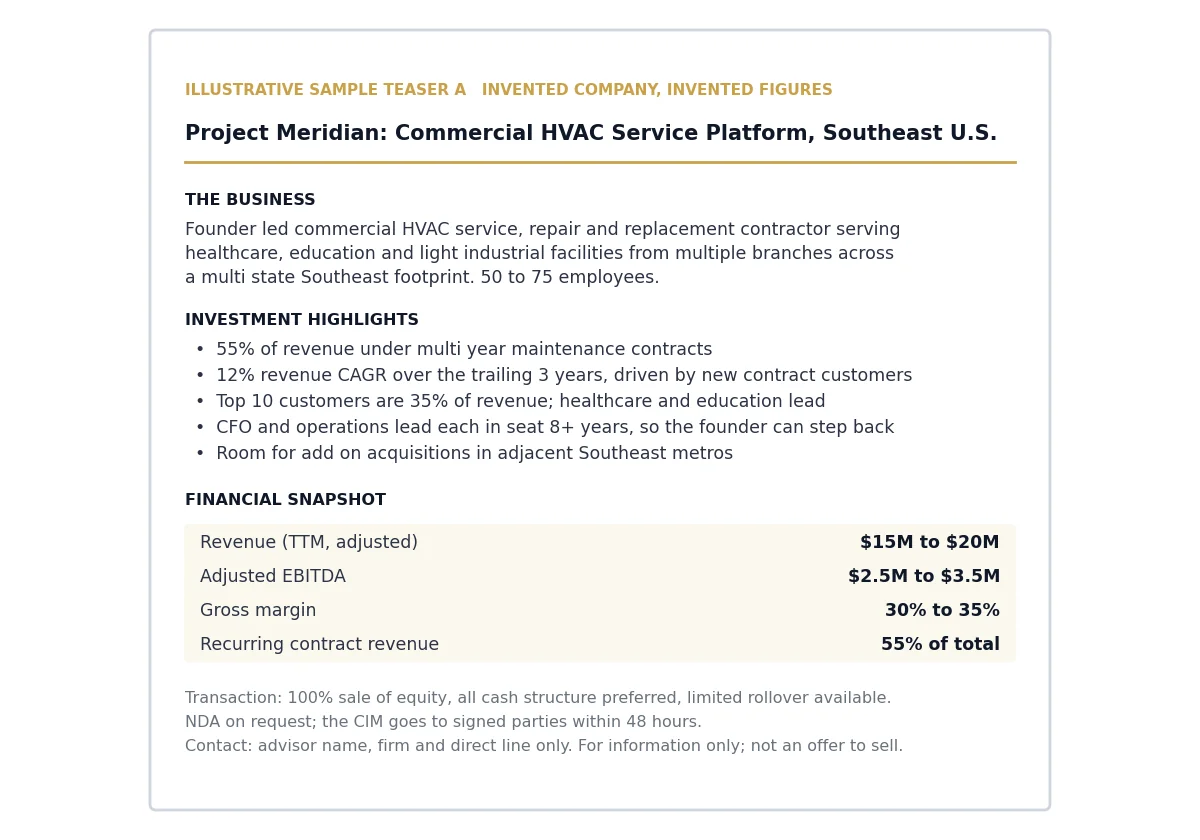
Project Meridian gives away a trade, a multi-state region, a headcount band, a size band, a growth rate and a deal structure: everything a buyer filters on, and nothing a competitor could use to pick out the company.
M&A teaser example 2: a blind profile for an SDE business
Owner-operated businesses are usually priced on seller’s discretionary earnings (SDE), which adds the owner’s pay and perks back to profit; our SDE vs EBITDA guide explains the split. A teaser at this size must say what the owner does each week, because the buyer often takes over that job. This sample is illustrative, with an invented company and invented figures.
Illustrative sample teaser B · invented company, invented figures
Project Lantern: Route-Based Residential Pest Control, Southeast
The business. Residential and light-commercial pest control company with 15+ years of operating history, 8 to 12 employees and its own route trucks, serving suburban customers across one Southeast state.
Highlights.
- Most revenue comes from quarterly service agreements billed automatically.
- No customer above 2% of revenue.
- Owner works about 45 hours a week on sales and scheduling; a lead technician runs daily routes.
- Leased office and yard; the lease can be assigned to a buyer.
| Financial snapshot (TTM) | Range |
|---|---|
| Revenue | $1.5M to $2M |
| Seller’s discretionary earnings | $450K to $550K |
| Owner transition offered | 6 to 12 months |
Next step. Sign the NDA to receive 3 years of tax returns, the route list by ZIP region and the CIM. Price guidance follows the NDA.
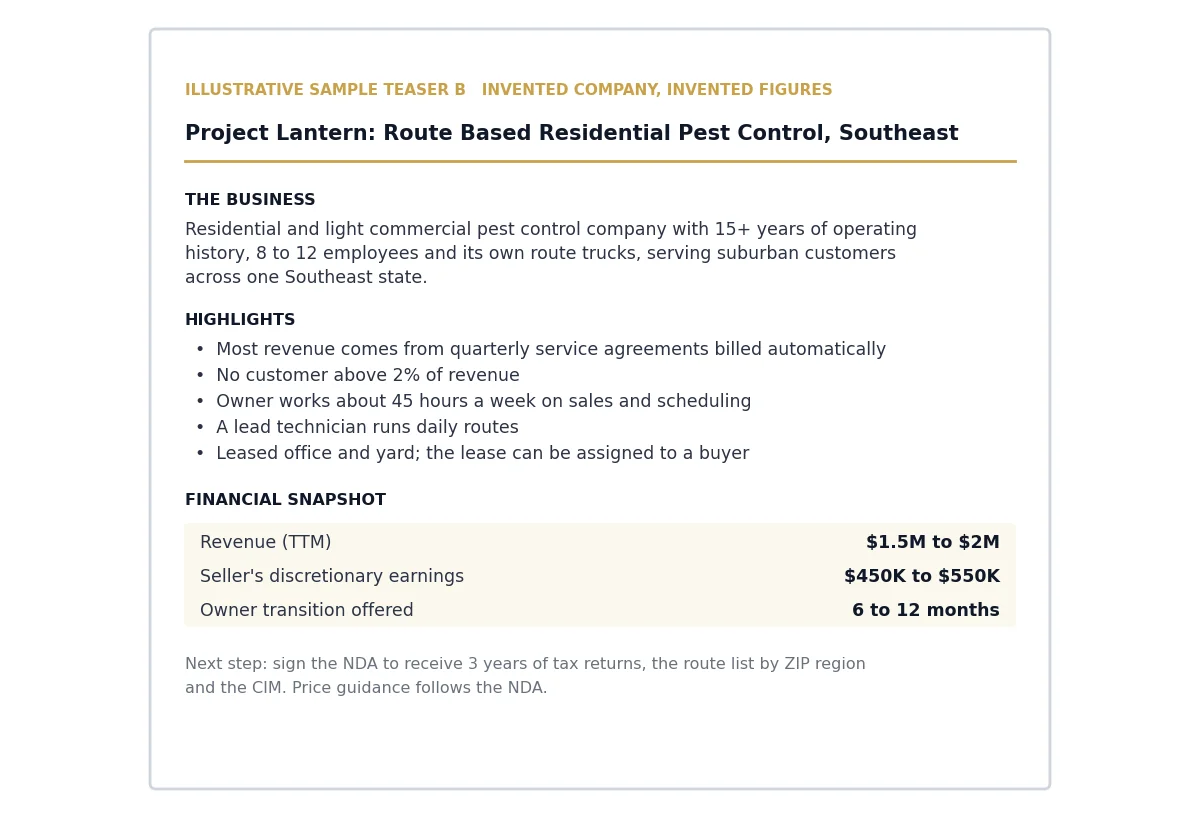
Project Lantern names one state instead of a region, because a small route business draws local buyers who need to know the drive time. It states owner hours, because a first-time buyer who plans to run the business needs to know which job comes with the purchase.
What does a real published M&A teaser look like?
Most teasers never become public, but Petrobras posted the Project Lucina teaser on its investor relations site when it put its 20% stake in MP Gulf of Mexico, LLC up for sale on October 4, 2021 (Petrobras release). Barclays prepared the 15-page document, which you can read as a PDF.
| Element in Project Lucina | What it says | For a founder-led blind teaser |
|---|---|---|
| Process overview, page 2 | Interest due by November 8th; data room for bidders who sign a confidentiality agreement and compliance certificate | Copy: one dated next step and the NDA gate |
| No-contact rule, page 2 | “Under no circumstances are bidders to directly contact management or employees” | Copy word for word |
| Key investment highlights, page 4 | Numbered highlights led by free cash flow generation | Copy: numbered, one figure each |
| Eligibility, page 7 | Market capitalization or net worth of at least US $500 million, or a rating not below Ba3/BBB- | Adapt: state the buyer types you will consider |
| Disclaimers, pages 11 to 15 | 5 pages: no securities offer, information not verified by Barclays | Shrink to 2 lines |
| Seller identity | Named: Petrobras and its 80% partner Murphy Exploration & Production Company | Change: stay blind |
The file carries one more lesson. Its PDF properties, read with the pdfinfo utility in November 2026, show the Title “Project Lucina Teaser”, an individual’s user name in the Author field and “Acrobat PDFMaker 11 para PowerPoint” as Creator. On a blind teaser, a field like that can name the owner or the company.
M&A teaser template: what goes in each field?
A working M&A teaser template has 9 fields, each with a blind rule. Fill it top to bottom using Project Meridian’s wording, then run every line through the mosaic test below. Kimberly Advisors suggests 3 to 10 investment highlights; on one page, 4 or 5 fit.
| Field | What to write | Example (Project Meridian) | Blind rule |
|---|---|---|---|
| Codename | A neutral project name | Project Meridian | No hint of founder, street or brand |
| Headline | Trade, model, region in under 10 words | Commercial HVAC Service Platform, Southeast U.S. | Multi-state region, never a city |
| Business description | What you sell, to whom, from how many sites | Service and repair for healthcare and education facilities | Customer types, never names |
| Investment highlights | 4 or 5 bullets, each with a figure | 55% of revenue under multi-year contracts | Percentages, not dollars per customer |
| Financial snapshot | Revenue, adjusted EBITDA or SDE, margin, growth | $15M to $20M revenue | Ranges; name the earnings measure |
| People | Headcount band, management depth | 50 to 75 employees; CFO 8+ years | Roles, never names |
| Transaction | Stake, structure, rollover | 100% of equity, limited rollover | No price in a competitive process |
| Next step | NDA on request, CIM timing | CIM within 48 hours of the NDA | Advisor contact only |
| Disclaimer | Information only, not an offer | One line at the foot | No footer with the real company name |
If your earnings figure carries add-backs, label it “adjusted” and keep the schedule ready for the CIM; our guide to adjusted EBITDA add-backs lists the ones buyers accept.
Want a second look at your teaser before it goes out?
CT Acquisitions helps owners of founder-owned businesses make the most of their exit: confidential sales, recapitalizations and exit planning, with a network of 500+ buyers. We work for owners on the sell side. Our fee is success only: nothing upfront, and you pay nothing unless the business sells. Try our free valuation calculator for a starting range before the call.
What should you leave out of a teaser to stay blind?
Leave out 6 things: the company name, the city, owner and staff names, customer and supplier names, exact revenue and EBITDA, and any file property that carries a name. In a small trade, a buyer who knows the market can match $17.4M of revenue to one company. Then test the combination of what is left, because facts that are safe one at a time can point to you together.
The mosaic test. Run every draft line through these 4 questions, in order, before it goes on the page.
- Does a buyer need this line to decide fit? Buyers filter on industry, size, geography, capital structure and how durable the revenue is. If the line helps none of those 5, cut it.
- Read alone, how many companies could it describe? If fewer than about 10 firms in your region could match the line, widen it: city to region, exact figure to range, named customer to a percentage and a type.
- Read with everything kept, does the field shrink to a handful? A pest control company in the Tampa metro, founded in 1998, with 65 employees is identifiable with no name at all. Drop founding year, exact headcount or location count first.
- Would your three most sensitive readers recognise you? Picture the teaser reaching your largest customer, your best employee and your nearest competitor. If any line would make one of them think of you, widen it again.
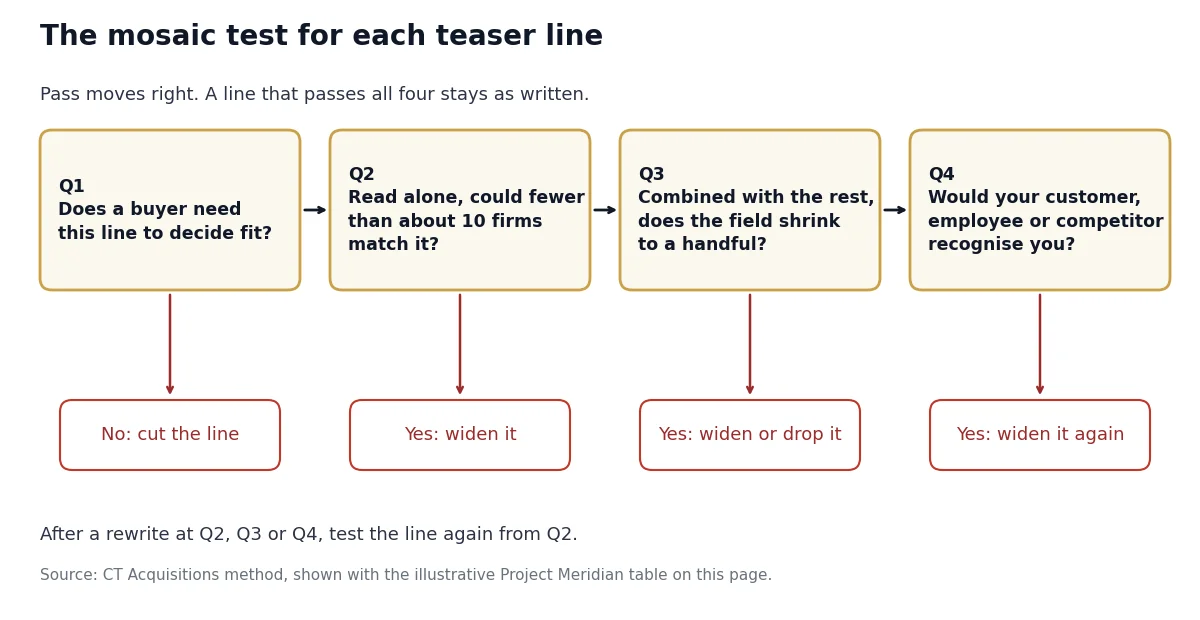
A line that fails question 1 is cut; a line that fails 2, 3 or 4 is rewritten and tested again from question 2. Illustrative example: the draft lines behind Project Meridian, the invented company in sample A.
| Draft line | Fails | Teaser version |
|---|---|---|
| Commercial HVAC contractor in Charleston, SC | Q2, a city | Commercial HVAC service and repair, Southeast |
| $17.4M revenue, $2.93M EBITDA | Q2, exact figures | $15M to $20M revenue, $2.5M to $3.5M EBITDA |
| Founded 1998, 63 employees, 3 branches | Q3, together they narrow the field | Founder-led, 50 to 75 employees, multi-branch |
| Maintenance contracts with the region’s largest hospital system | Q4, the customer would know | 55% of revenue under multi-year contracts; top 10 customers are 35% of revenue |
| Owner’s son runs operations | Q1 and Q4 | Cut. Cover management depth in the CIM |
| 12% revenue CAGR, trailing 3 years | Passes all four | Keep as written |
Every rewrite still tells a buyer the trade, size band, region and how recurring the revenue is. If the draft feels thin, sharpen the highlights rather than adding identifying facts; our article on customer concentration explains why the top 10 share belongs on page 1.
How do you write and send an M&A teaser?
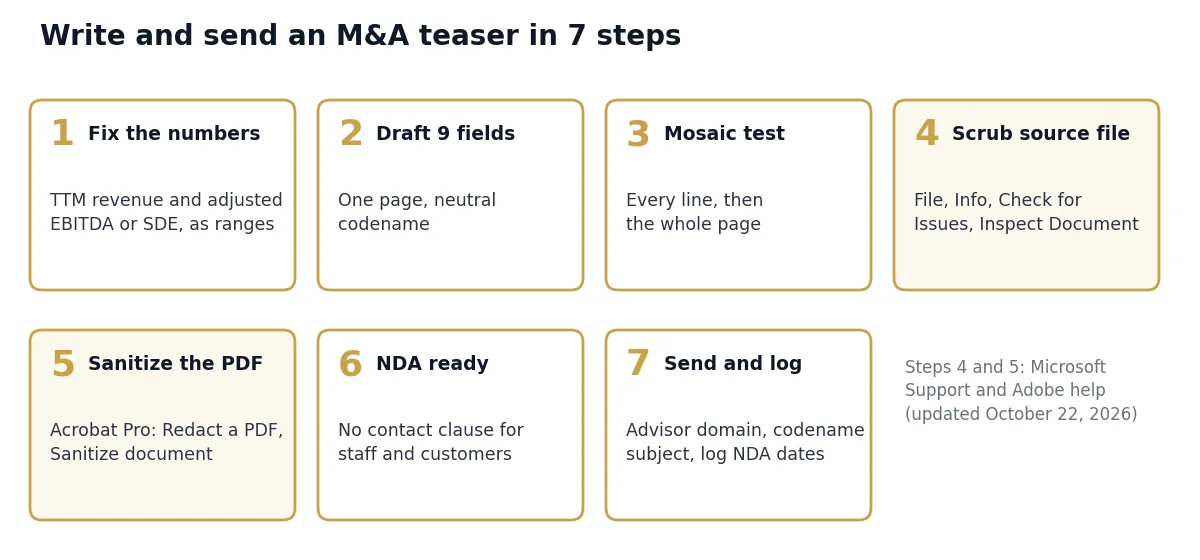
Write the teaser after the CIM draft and the financial model agree, because every range has to hold up when the buyer opens the CIM 48 hours later. WorldBC’s readiness checklist makes the same point: figures must match the model (WorldBC, August 12, 2023). Then work through 7 steps.
- Fix the numbers. Take trailing twelve months revenue and adjusted EBITDA, or SDE, from the schedule the CIM uses, and set each range so the true figure sits inside it.
- Draft the 9 fields on one page under a neutral codename.
- Run the mosaic test on every line, then on the page as a whole.
- Scrub the source file. In Word or PowerPoint, save a copy, select File, Info, Check for Issues, Inspect Document and remove document properties, comments and revisions (Microsoft Support).
- Sanitize the PDF. In Acrobat Pro, select All tools, Redact a PDF, Sanitize document, Remove all, and save under the codename (Adobe). Check File, Properties: Author and Title should be empty.
- Have the NDA ready before the first send, with a no-contact clause for staff, customers and suppliers, as Lucina stated on page 2.
- Send from the advisor’s domain with the codename in the subject line, and log each recipient, NDA date and CIM date.
Our business sale process guide shows where the teaser sits between preparation and the letter of intent.
Which teaser version fits your business?
Three facts decide the version: whether the sale is already public, whether you measure earnings as EBITDA or SDE, and how many firms in your region do what you do. Use this decision table to choose, then adjust the 9 template fields to match.
| If your situation is | Then do this |
|---|---|
| If the sale is already public, as Petrobras announced on October 4, 2021 | A named teaser is fine; spend the space on eligibility and process dates |
| If you run a private founder-led company with $1M+ of EBITDA | Use sample A: blind, EBITDA ranges, multi-state region |
| If the owner draws the profit and works full time in the business | Use sample B: SDE ranges, owner hours, transition period |
| If fewer than about 10 firms in your region could match the headline | Widen the region, drop the founding year, name only the end-market type |
| If one customer is a household name in your region | Show its share as a percentage and a customer type only |
| If you are open to rollover equity or an earnout | Write “limited rollover available”; leave structure detail for the CIM |
What mistakes make buyers pass on a teaser?
Buyers pass for two opposite reasons: the teaser is so generic it reads like 50 others, or so specific that the owner is exposed before any NDA is signed. Each mistake below has a fix you can check against Project Meridian and Project Lantern; for what your ranges mean in price, see what your business is worth in 2026.
| Mistake | What it costs | Fix |
|---|---|---|
| Naming the city or a marquee customer | The process is no longer confidential | Region and customer type only |
| “Profitable B2B services business in the Southeast” | No filter value, so buyers skip it | Trade, model and end market in the headline |
| Calling SDE “EBITDA” | The buyer reprices at the CIM stage | Name the measure you use |
| No growth rate | Buyers assume revenue is falling | Show a trailing 3-year CAGR |
| Author name left in the PDF | Identifies the owner or the company | Document Inspector, then Acrobat Sanitize |
How we compiled this
We compiled this page in November 2026 from 8 documents: the Project Lucina teaser PDF and its file properties, the Petrobras release of October 4, 2021, Microsoft and Adobe help pages on removing hidden data, and teaser guides from IMAP, Corporate Finance Institute, WorldBC and Kimberly Advisors. Both sample teasers are illustrative: the companies and figures are invented. We excluded forum threads and teaser conversion rates we could not trace to a named, dated dataset.
Frequently asked questions
What is a teaser in the context of M&A?
A teaser is a one- or two-page anonymous summary of a company for sale, sent to potential buyers before they sign an NDA. It names the trade, the region, revenue and EBITDA ranges and the deal type, and leaves out the company name. Buyers who want more sign the NDA and receive the 30 to 80+ page CIM, according to IMAP.
How long should an M&A teaser be?
One page is the target and two pages is the limit for a private company. IMAP and WorldBC both give one to two pages, while Corporate Finance Institute’s 2019 guide gives both one to two and two to three. Public-company teasers run longer: Barclays’ Project Lucina teaser for Petrobras was 15 pages, 5 of them disclaimers.
Should the company name be in the teaser?
Not for a private founder-led company. WorldBC notes that in many sell-side processes the name is withheld until the recipient is qualified and has signed an NDA. A named teaser fits only when the sale is already public, as with Petrobras, which announced its MP Gulf of Mexico stake sale on October 4, 2021 before Barclays circulated the teaser.
Is there an M&A teaser template I can copy?
Yes. The template on this page has 9 fields: codename, headline, business description, investment highlights, financial snapshot, people, transaction, next step and disclaimer, each with a blind rule. Fill it using the illustrative Project Meridian wording for an EBITDA business or Project Lantern for an SDE business, then run every line through the 4-question mosaic test.
How do I remove hidden data from a teaser PDF?
Run two passes. In Word or PowerPoint, select File, Info, Check for Issues, Inspect Document and remove document properties, comments and revisions. After export, open Acrobat Pro, select All tools, Redact a PDF, Sanitize document and Remove all. Then check File, Properties: the Lucina teaser still showed an individual’s user name in its Author field.
Sources
- Barclays for Petrobras, Project Lucina teaser (Opportunity Overview), October 2021, PDF and file properties, accessed November 2026
- Petrobras, “Petrobras releases teaser of E&P assets in the Gulf of Mexico”, October 4, 2021, accessed November 2026
- Microsoft Support, Remove hidden data and personal information by inspecting documents, accessed November 2026
- Adobe, Sanitize PDFs in Acrobat Pro, updated October 22, 2026, accessed November 2026
- IMAP, CIM vs. Teaser: What Goes In Each and Why It Matters, 2026, accessed November 2026
- Corporate Finance Institute, Investment Teaser, October 29, 2019, accessed November 2026
- WorldBC, M&A Investment Teaser: Template, Examples and Key Sections, August 12, 2023, accessed November 2026
- Kimberly Advisors, What Is A Teaser in M&A?, accessed November 2026
Want a Specific View of Your Business?
30 minutes, confidential, no contract, no cost. You leave with a view of your local buyer market and a likely valuation range.